Intercepting Route In Next.js
What is the intercept route & how to use it with parallel route ?
 Ali AbdElbagi Ali·May 23, 2026
Introduction
Intercepting route is a technique in Next.js that allows you to display a route from another part of your application, within the same current layout, without requiring the user to switch to a different context.
Intercepting route is always used with Parallel Route to build modals.
For example, when you click on an image on Instagram, what happens is:
1- A modal appears containing the image and its details, and the feed continues to run in the background.
2- The link changes from https://www.instagram.com to https://www.instagram.com/p/DYpin6_DOsV/

What happens if the link opens in a new window, or shared, or the user refreshes the page, the modal is not displayed. Instead, a full page dedicated to the image with more details is displayed.

Intercepting route allows for the construction of this exact model: one link, and two different views depending on the user's approach.
Behind the Scenes
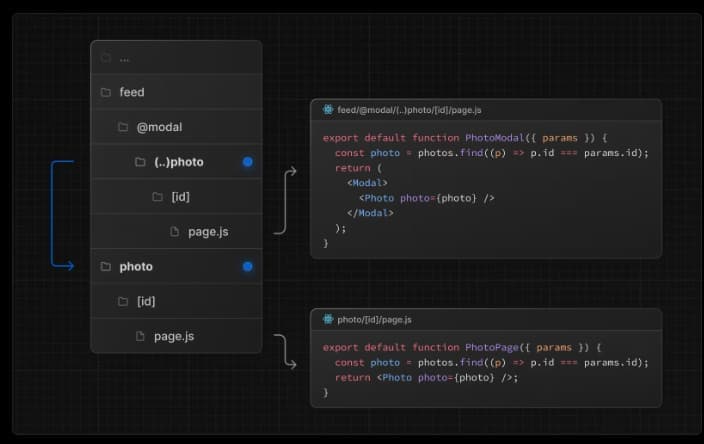
What happens exactly is that Next.js intercepts the navigation request for the given page, and instead of displaying the page, it passes it to a specific @slot, which is the Parallel Route
Folder Structure
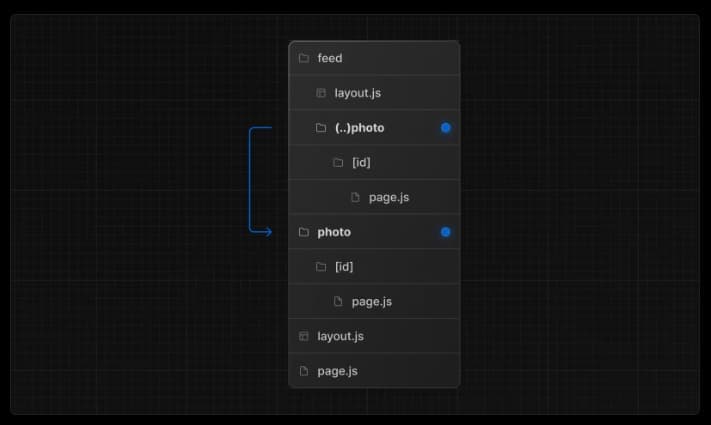
The intercept route file is defined by creating a file that begins with (.), (..), or (..)(..), (...) where:
(.) is used to match a segment at the same level.
(..) is used to match a segment one level above.
(..)(..) is used to match a segment at two levels above.
(...) is used to match a segment at the root level. The importance of matching is evident when a user opens a new window or shares a link; the modal will not open, but the result will appear on a full standalone page. The intercept segment must match the full standalone page at the same level.
It should also be noted that the intercept route (...) relies on the route segment for matching, not the file system. The segment is part of the URL, while the @folder in the Parallel Route is not considered part of the segment but rather a file system.
The images below illustrate the file structure :