How Browsers Works
To understand and improve the performance of any website, it is essential to begin by understanding how browsers display and process pages.
Introduction
To improve performance, developers must have a prior understanding of how browsers work.
Page Display Steps
- Navigation
- Fetching & Parsing Resources
- Render
- Layout
- Paint
- Composition
1- Navigation
Navigation refers to the process of opening the browser and typing the page's URL into the search bar. Essentially, you are requesting the server to display that page for you. This is the first step in the page display process.
2- Fetching & Parsing Resources
The browser begins performing these two processes simultaneously, starting with the Fetching process. The first step is:
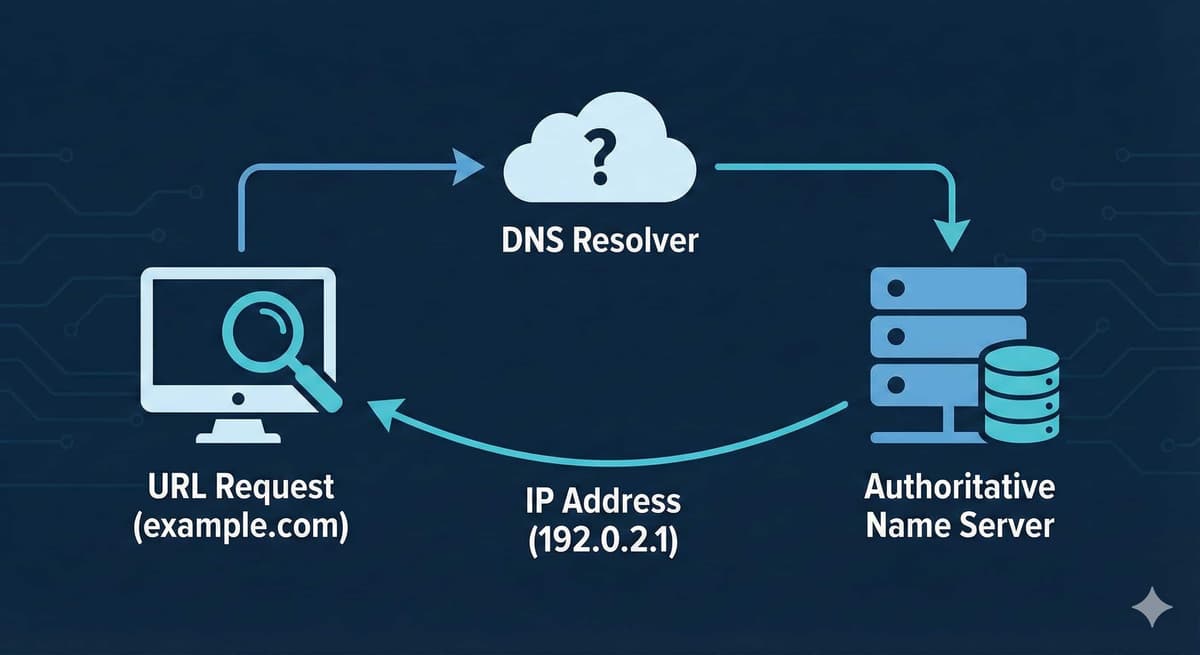
Domain Name System (DNS) Lookup
This is the process of finding the website's IP address using the DNS. DNS is similar to a phone book; each name on the list has a corresponding phone number. Similarly, each website has its own IP address and domain name. For example, when you type https://google.com, the browser looks up the HTML page on the server at the address 142.251.32.46.
TCP Handshake
After obtaining the IP address, the browser communicates with the server via TCP (Transmission Control Protocol), which uses a three-way handshake. (Also known as SYN, SYN-ACK, & ACK) This allows both parties (the browser or client and the server) to communicate and prepare for data exchange. The process, in short, is as follows:
- The client sends a SYN packet, also known as a SYNchronize packet.
- The server receives the packet sent by the client and responds with a SYNchronize-ACKknowledgement.
- The client receives the synchronization acknowledgment from the server and sends an ACKknowledgement.
To learn more about the TCP handshake, see TCP handshae
Transport Layer Secure Negotiation
The TLS protocol is responsible for securing communication between the client and the server.
The negotiation process involves agreeing on how data will be protected and the type of encryption used. This process is crucial because it ensures data remains secure during its journey between the server and the client.
To learn more about TLS, visit TLS
After the client connects to the server and the connection is secured, the client sends an HTTP GET Request, which is a request to the server for an HTML file.
The server receives the request and sends the HTML file, along with information about the HTTP Response, known as the Response Header.
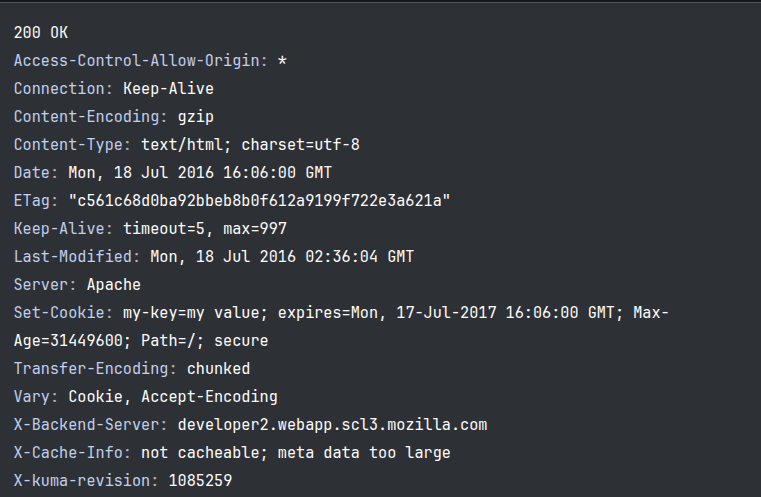
The Response contains the first byte of data received. A very important factor in performance is the time between the client's request to the website and the server's response and the arrival of the first HTML packet. This time is known as Time to First Byte (TTFB).
An important process that occurs at the beginning of data transmission after a TCP connection is established is the Congestion Control process Response Header .
The Response contains the first byte of data received. The term "congestion" refers to the fact that a TCP packet is not sent all at once, but rather divided into segments. As mentioned earlier in the Handshake phase, the server receives an ACK (acceptance) from the client in the form of an ACK packet after several segments have been sent.
- If the server waits for the ACK after each segment, the processing time will increase. This is the first scenario.
- If we decide to send several segments all at once, the client will be unable to receive them because it will be busy sending ACKs. This occurs in busy network conditions.
This is where the solution lies: using the TCP Slow Start algorithm TCP Slow Start, which balances the number of transmitted chunks. This balance is achieved as follows:
The amount of data transmitted is gradually increased until the network bandwidth reaches its maximum limit. The amount of data is also reduced during periods of high network load.
Parsing
During the Fetch process, if the first chunk of data arrives, the parsing process will begin.
The HTML parser reads HTML code as a stream and then builds a Document Object Model (DOM) tree. If it encounters CSS-related code, it also builds a CSS Object Model (CSSOM) tree. However, if it encounters <script> and it doesn't have the async or defer properties, it stops the HTML parsing process to load the JS code. This is where the preload scanner becomes crucial. The preload scanner is a second parser that works alongside the main parser. Its important role is to detect and fetch important resources early to prevent blocking.
Building the DOM & CSSOM Tree
The DOM tree illustrates the contents of the document. The <html> is the main root of this tree, from which the rest of the page and each element's child branches out.
 The larger the number of elements, the longer the building process will take.
Building the CSSOM Tree
While the DOM tree is being built, the browser also builds the CSSOM tree. The browser converts the CSS rules into map styles. It builds a rules tree for each specific property, for example:
css1.header { 2color:red 3}
The browser builds a tree for the element with the header class, which has children, and assigns each child—if it's text—the color red.
Other Operations: Other operations occur, such as JS compilation. While the parser is building the CSSOM tree, the preload scanner retrieves the JS files, and then the compilation and interpretation process takes place.
An important article about these processes: A Closer Look at Compilation and Interpretation
A second process also occurs: Building the Accessibility Tree.
Rendering
After the DOM and CSSOM are fully constructed, the rendering process begins. The browser combines them to create a render tree.
The rendering process starts by looking at the DOM tree from the top, ignoring elements like meta, script, and title, as well as any element with the display: none property.
Any element whose CSS properties are applied according to the CSSOM tree is then processed. This is called Style Calculations.
The Render Tree determines which elements will be displayed and which properties will be applied to them, but it doesn't specify the dimensions or position of each element on the screen.
This is where the next step comes in.
Layout
The browser creates layout boxes for each element, calculating the position and dimensions of each element and taking into account the viewport size based on the screen from which the page is being displayed.
Paint
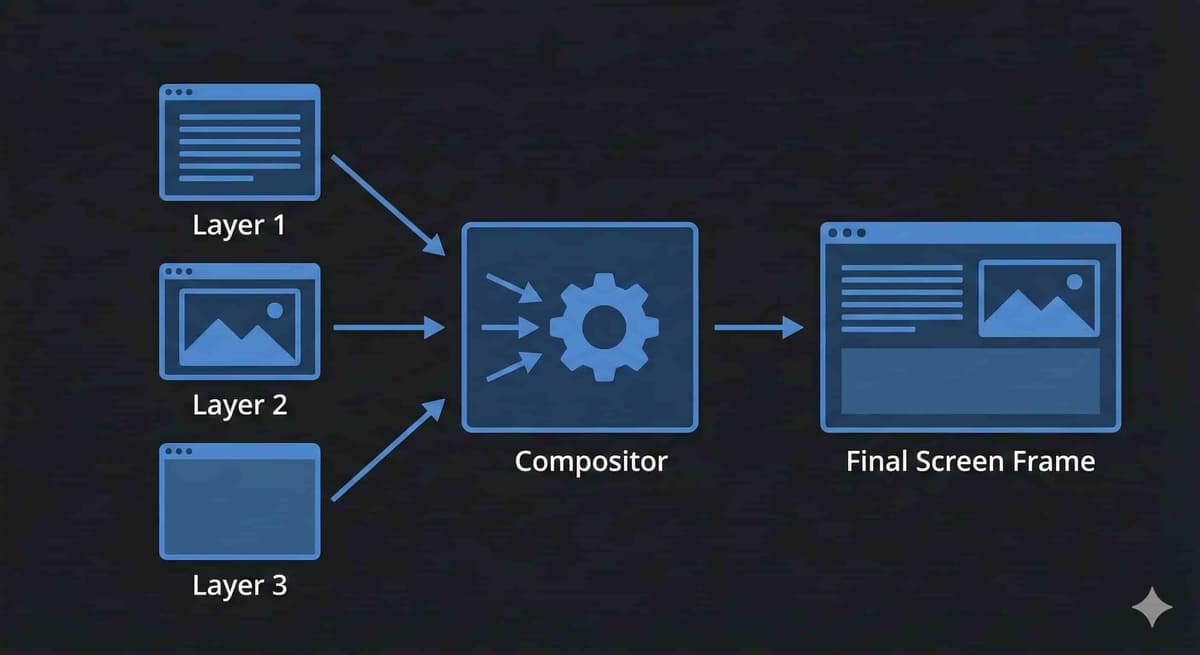
The browser converts each box created in the previous step into pixels, where each visible element is drawn on the screen with all its properties, such as size, color, shadows, borders, etc. The painting process is divided into several layers.
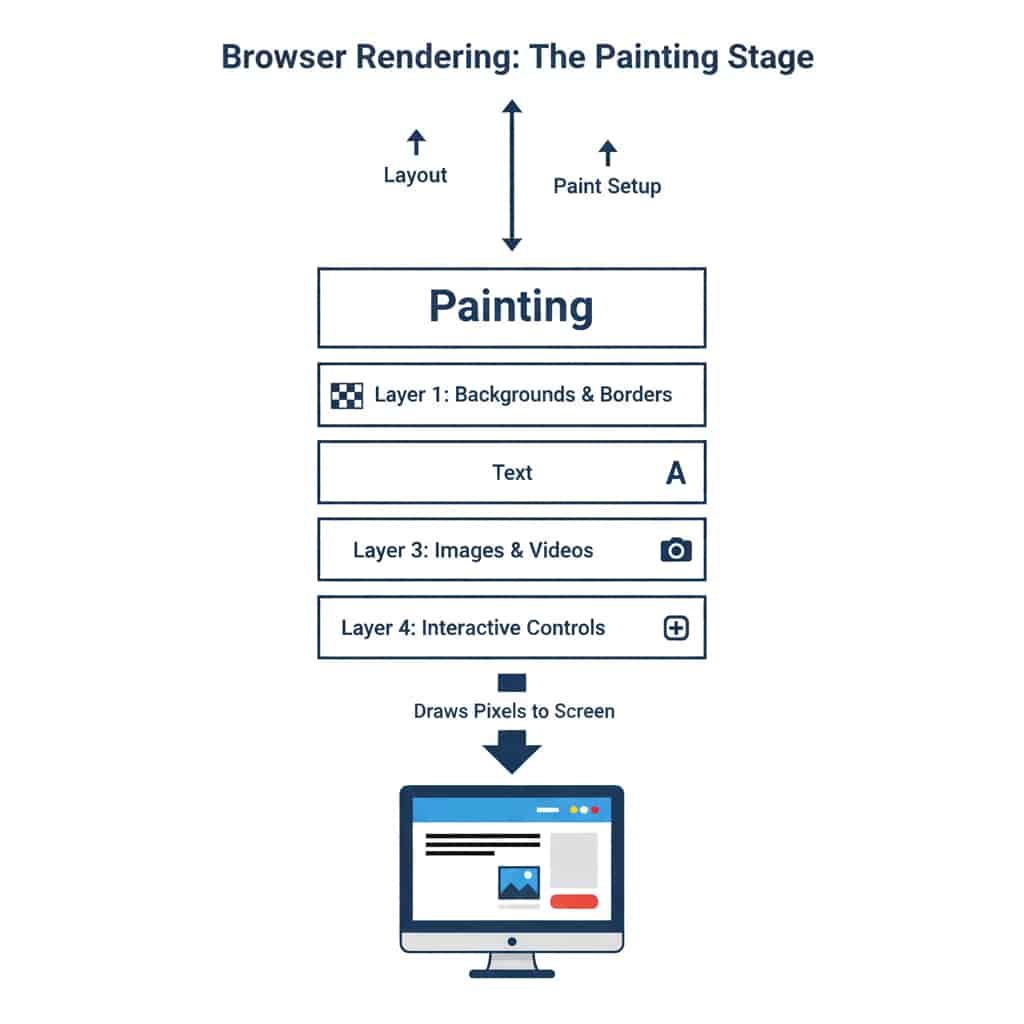
Composition
The browser combines all the layers into the final page layout that appears on the screen.
Modern browsers separate parts of the page into several layers, such as elements with properties like position: fixed, opacity, transform, or animation, so that these layers can be manipulated without needing to redraw the page.